

In today’s digital age, having a strong online presence is crucial for local businesses aiming to attract customers in their area. One of the most effective methods to enhance your business’s visibility in search results is by using Local Business Schema Markup. Implementing and optimizing this structured data can significantly improve your website’s search visibility and increase your chances of appearing in rich results, such as Google’s local packs, maps, and even voice search queries.
This guide provides a comprehensive approach to implementing and improving Local Business Schema, helping business owners and marketers to boost their online presence effectively.
Introduction to Local Business Schema
Overview of Schema Markup and Its Role in SEO
Schema markup is a form of structured data that helps search engines better understand the content on your website. Using schema, you provide search engines with specific information about your business, which they use to present rich results. Rich results—such as star ratings, business hours, and reviews—help your website stand out from competitors in search results.
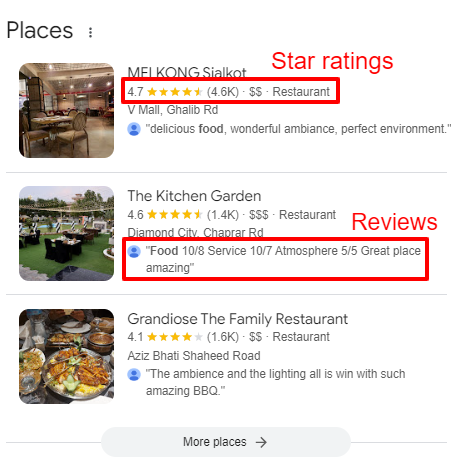
Importance of Structured Data for Local Businesses
Local businesses benefit greatly from implementing schema markup. It ensures that vital business information, such as name, address, phone number (NAP), and business hours, is accurately displayed in search results. This not only improves online visibility but also makes it easier for customers to find essential business details.
How Search Engines Use Schema to Display Rich Results in Local Searches
Search engines like Google use schema markup to generate rich snippets and display detailed information about local businesses. For example, if a user searches for “coffee shops near me,” Google might show a local business’s hours, location, and reviews directly in the search results, thanks to schema markup.
Understanding Local Business Schema Markup
What is the Local Business Schema?
The Local Business Schema is a specific type of structured data designed for businesses operating in a particular geographic location. It includes essential details like your business name, address, operating hours, services, and reviews. Implementing this schema increases your chances of appearing in Google’s local search results and enhances your visibility in local packs.
Key Properties of Local Business Structured Data
Some essential properties within the Local Business schema include:
- @type: Defines the entity as a Local Business.
- Name: The name of your business.
- Address: Includes street address, postal code, and city.
- Telephone: Your business contact number.
- Opening hours: The hours your business is open.
- Geo: Latitude and longitude coordinates.
Step-by-Step Guide to Implementing Local Business Schema
Choosing the Right Schema Type for Your Business
Selecting the correct schema type depends on your business model. Most local businesses will use the LocalBusiness schema, but industry-specific schemas, such as Restaurants or Dentists, are available for niche markets.
Tools for Generating Schema Markup
Here are some useful tools to help you create schema markup for your website:
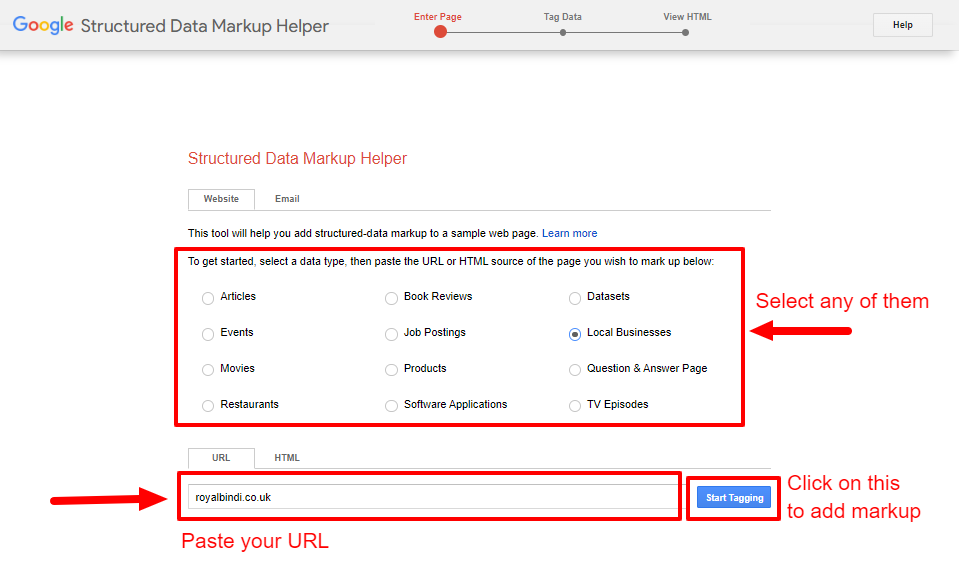
1.Google’s Structured Data Markup Helper: Allows you to create JSON-LD schema for your site.
2.Schema.org: Provides comprehensive documentation on different schema types.
3.Schema App: A user-friendly tool for generating structured data without requiring coding skills.
How to Embed Schema on Your Website (JSON-LD Recommended)
The most recommended format for embedding schema markup is JSON-LD (JavaScript Object Notation for Linked Data). JSON-LD is simpler to implement, maintain, and update than other formats, such as Microdata. It doesn’t interfere with visible content, making it less intrusive.
You can add this structured data to the section of your website or insert it into key pages like your homepage, contact page, or service pages.
For JSON-LD Format Example and Microdata Format Example please design it according to the image below :
- JSON-LD Format Example
- Microdata Format Example
- @context: This specifies the format of the structured data you’re using. In this case, it’s “https://schema.org”, which tells search engines you’re using Schema.org vocabulary.
- @type: This defines the type of business you’re marking up. For a local business, it’s “LocalBusiness”.
- name: The name of your business. Replace “Your Business Name” with the actual name of your business, e.g., “Joe’s Coffee Shop”.
- image: The URL of your business’s logo or an image representing it. Replace “https://www.example.com/logo.jpg” with your own logo’s URL, e.g., “https://www.joescoffeeshop.com/logo.jpg”.
- address: Provides the complete address of your business. Replace “123 Main St”, “Your City”, “Your State”, “12345”, and “US” with your actual business address details.
- telephone: Your business’s phone number. Replace “+1-123-456-7890” with your actual contact number.
- priceRange: Indicates your pricing range. Use symbols like $, $$, or $$$ to represent how expensive your business is.
- openingHoursSpecification: Specifies the hours your business is open. You can list multiple days. For each day, replace the opening and closing times with your business’s actual hours. For example, “opens”: “09:00” and “closes”: “17:00” for a 9 AM to 5 PM schedule.
- url: The URL of your business’s website. Replace “https://www.example.com” with your actual website link, e.g., “https://www.joescoffeeshop.com”.
- aggregateRating: Displays the overall rating of your business. Replace “ratingValue”: “4.5” and “reviewCount”: “24” with your actual ratings and number of reviews.
Code
<script type="application/ld+json">
{
  "@context": "https://schema.org",
  "@type": "LocalBusiness",
  "name": "Your Business Name",
  "image": "https://www.example.com/logo.jpg",
  "address": {
    "@type": "PostalAddress",
    "streetAddress": "123 Main St",
    "addressLocality": "Your City",
    "addressRegion": "Your State",
    "postalCode": "12345",
    "addressCountry": "US"
  },
  "telephone": "+1-123-456-7890",
  "priceRange": "$$",
  "openingHoursSpecification": [{
      "@type": "OpeningHoursSpecification",
      "dayOfWeek": "Monday",
      "opens": "09:00",
      "closes": "17:00"
    },
    {
      "@type": "OpeningHoursSpecification",
      "dayOfWeek": "Tuesday",
      "opens": "09:00",
      "closes": "17:00"
    }
  ],
  "url": "https://www.example.com",
  "aggregateRating": {
    "@type": "AggregateRating",
    "ratingValue": "4.5",
    "reviewCount": "24"
  }
}
</script>
Alternatively, if you prefer to use Microdata, you’ll need to embed the structured data directly within the HTML tags using attributes like itemprop.
itemscope and itemtype: These define the type of entity you’re marking up. In this case, it’s “LocalBusiness”, and it tells search engines that you’re providing information about a local business.
itemprop=”name”: This is where you enter your business’s name. Replace “Your Business Name” with the actual name, e.g., “Joe’s Coffee Shop”.
itemprop=”address”: Defines your business’s address. Replace “123 Main St”, “Your City”, “Your State”, “12345”, and “US” with your business’s actual street address, city, state, postal code, and country.
itemprop=”telephone”: Your business’s phone number. Replace “+1-123-456-7890” with your actual contact number.
itemprop=”priceRange”: The price range for your services. Use symbols like $, $$, or $$$ depending on your business pricing.
itemprop=”openingHoursSpecification”: Describes your business’s opening hours. Replace “Monday”, “09:00”, and “17:00” with your actual day of operation and the opening and closing times.
itemprop=”url”: The URL to your business’s website. Replace “https://www.example.com” with your website link, e.g., “https://www.joescoffeeshop.com”.
itemprop=”aggregateRating”: Displays the average rating and number of reviews for your business. Replace “4.5” and “24” with your actual business rating and review count.
Code:
<div itemscope itemtype="https://schema.org/LocalBusiness">
  <span itemprop="name">Your Business Name</span>
  <div itemprop="address" itemscope itemtype="https://schema.org/PostalAddress">
    <span itemprop="streetAddress">123 Main St</span>,
    <span itemprop="addressLocality">Your City</span>,
    <span itemprop="addressRegion">Your State</span>,
    <span itemprop="postalCode">12345</span>,
    <span itemprop="addressCountry">US</span>
  </div>
  <span itemprop="telephone">+1-123-456-7890</span>
  <span itemprop="priceRange">$$</span>
  <div itemprop="openingHoursSpecification" itemscope itemtype="https://schema.org/OpeningHoursSpecification">
    <meta itemprop="dayOfWeek" content="Monday">
    <meta itemprop="opens" content="09:00">
    <meta itemprop="closes" content="17:00">
    <span>Monday: 9:00 AM - 5:00 PM</span>
  </div>
  <a href="https://www.example.com" itemprop="url">Visit Our Website</a>
  <div itemprop="aggregateRating" itemscope itemtype="https://schema.org/AggregateRating">
    <span itemprop="ratingValue">4.5</span> stars from
    <span itemprop="reviewCount">24</span> reviews.
  </div>
</div>
Validating and Testing Your Schema
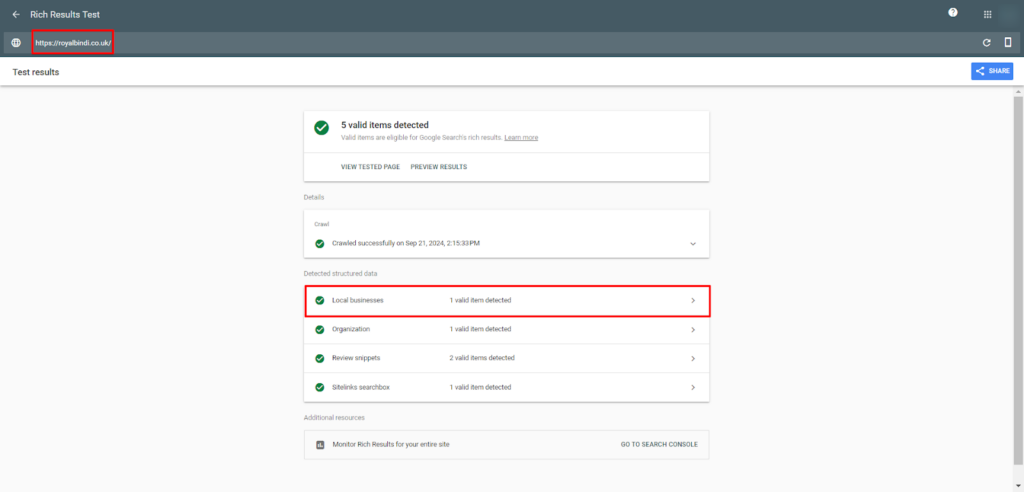
Testing Structured Data Using Google’s Rich Results Test
Once your schema is implemented, it’s essential to test it for errors. Use Google’s Rich Results to verify if your schema is eligible for rich results in search. This tool highlights errors and suggests fixes.
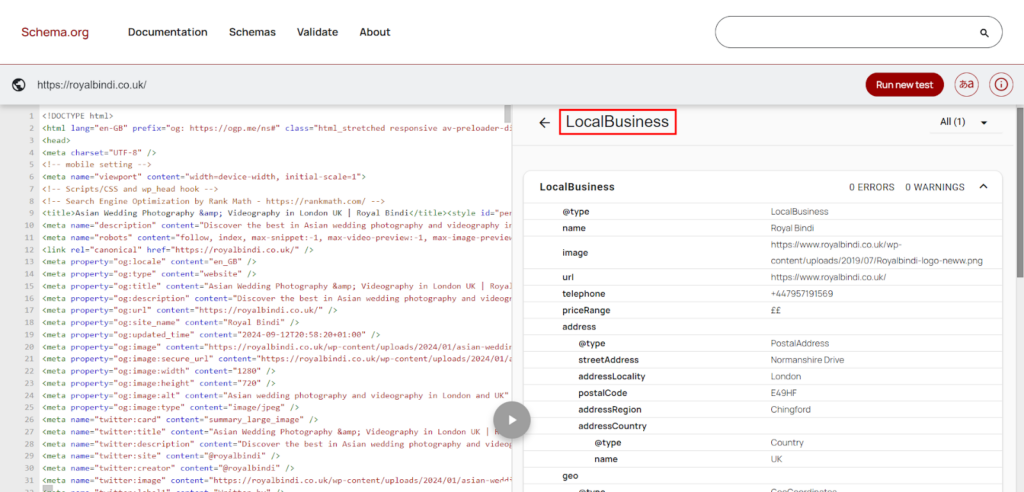
Using the Schema Markup Validator for Ensuring Accuracy
The Schema Markup Validator helps ensure that your structured data follows correct syntax and avoids common issues. Validation ensures your schema works effectively in search engines.
Improving and Optimizing Your Local Business Schema
Keeping Schema Updated with Business Information (NAP Consistency)
Ensure that your business information, particularly Name, Address, and Phone Number (NAP), is consistent across your website, schema, and online listings. Any changes to your business hours or location should be reflected in the schema.
Enhancing Schema with Reviews, Ratings, and Social Media Links
You can improve your Local Business Schema by adding extra details like reviews, ratings, and social media links. These enrich your schema and increase the likelihood of appearing in rich results.
Conclusion
Local Business Schema is essential for businesses looking to improve their visibility in local search results. Properly implementing and optimizing schema markup can help you stand out in search results, increase click-through rates, and enhance your overall SEO performance. Regular updates to your schema ensure that your business remains relevant and competitive in an evolving digital landscape.
Frequently Asked Questions (FAQs)
How Often Should I Update My Local Business Schema?
You should update your schema anytime there is a change in your business’s NAP, hours, or services. Regularly review your schema to ensure it stays accurate and effective.
Can Schema Markup Help with Multiple Business Locations?
Yes, schema markup supports businesses with multiple locations. You can create separate schema entries for each location, ensuring that users find the right details for their nearest branch.
What’s the Difference Between Local Schema and Other SEO Techniques?
While SEO focuses on optimizing content, local schema specifically enhances how search engines display information about your business, resulting in rich snippets and improved local search visibility.


