

If you’re managing a website, you’ve likely encountered errors or issues related to 404 pages. However, a term that might be less familiar to you is “fake 404.” This issue, although less common, can severely impact your website’s performance and ranking in search engines like Google. Fake 404 pages, indexed 404 URLs, or even URLs created by malware can wreak havoc on your SEO efforts. In this article, we’ll explain what fake 404 errors are, why they’re problematic, and how to address them effectively.
Understanding Fake 404 Errors
A “404 error” typically indicates that a page requested by a user does not exist on your website. This happens when a user clicks on a link to a page that has been moved, deleted, or had its URL changed. Properly handled 404 errors are not inherently bad; in fact, they are a normal part of website management. However, fake 404 errors occur under different circumstances.
A fake 404 occurs when URLs that never actually existed on your site, or were generated maliciously, get indexed by search engines. This can happen for several reasons:
- Malware or Hacking: If your site is compromised by hackers, they might create spammy or malicious URLs that search engines index. When users visit these URLs, they often encounter either a 404 error or are redirected to undesirable locations.
- Improper Redirects: Sometimes websites mistakenly redirect non-existent pages to the homepage, causing these pages to be indexed by search engines. This can be seen as a fake 404 because the content doesn’t actually exist, but instead of showing a proper 404 page, the website redirects the user to another page.
- URL Parameters Gone Wild: Sometimes dynamic URLs with parameters (like ?replytocom) can get out of control and lead to the indexing of numerous unnecessary pages that return 404 errors.
- Misconfiguration of Plugins or Tools: Incorrect configurations of SEO plugins such as Rank Math or Yoast can result in improper redirection and indexing of non-existent URLs, leading to fake 404 errors.
Why Fake 404 Errors are Problematic
Fake 404 errors are more than just an inconvenience—they can significantly affect your website’s performance in several ways:
- Negative Impact on SEO: Google and other search engines may penalize your site for having too many non-existent or fake pages indexed. This can lead to lower rankings, decreased organic traffic, and a loss of credibility.
- User Experience Issues: When users encounter fake 404 errors, they can become frustrated and leave your site. A poor user experience can also lead to higher bounce rates, which can further damage your SEO.
- Security Concerns: If the fake 404s are caused by malware, they could be redirecting users to dangerous sites or serving malicious content. This puts both your site and your users at risk.
- Crawling and Indexing Problems: Fake 404 pages can clog up your crawl budget, which is the amount of time and resources search engines allocate to indexing your site. This can prevent search engines from properly indexing your legitimate content, leading to lower visibility in search results.
How to Identify Fake 404 Errors
Before you can address fake 404 errors, you need to identify them. Here’s how you can spot fake 404s on your site:
- Google Search Console (GSC): The first step is to check your Google Search Console account. GSC will report any 404 errors it encounters while crawling your site. Pay special attention to the Coverage report, which will show URLs that Google tried to index but resulted in 404 errors.
- Site Audits: Use tools like Screaming Frog, Ahrefs, or SEMrush to conduct a comprehensive audit of your site. These tools can help identify any broken links, 404 errors, or suspicious URLs that may have been indexed.
- Manual Checks: Manually review your sitemap and compare it with the list of indexed URLs in Google. If you notice URLs that shouldn’t be there or look suspicious, investigate further.
- Security Scans: Run regular security scans on your site using tools like Sucuri or Wordfence. These tools can help identify malware or hacking attempts that may be generating fake 404 errors.
How to Handle Fake 404 Errors
Once you’ve identified fake 404 errors on your site, it’s time to address them. Here’s a step-by-step guide to handling fake 404s:
1. Remove Malicious Code and Malware
- If your site was hacked and fake URLs were generated, the first step is to remove any malicious code. Use security plugins like Wordfence or Sucuri to scan your site for malware and clean it up.
- After removing the malware, change your passwords and update your software to prevent future attacks.
2. Fix Improper Redirects
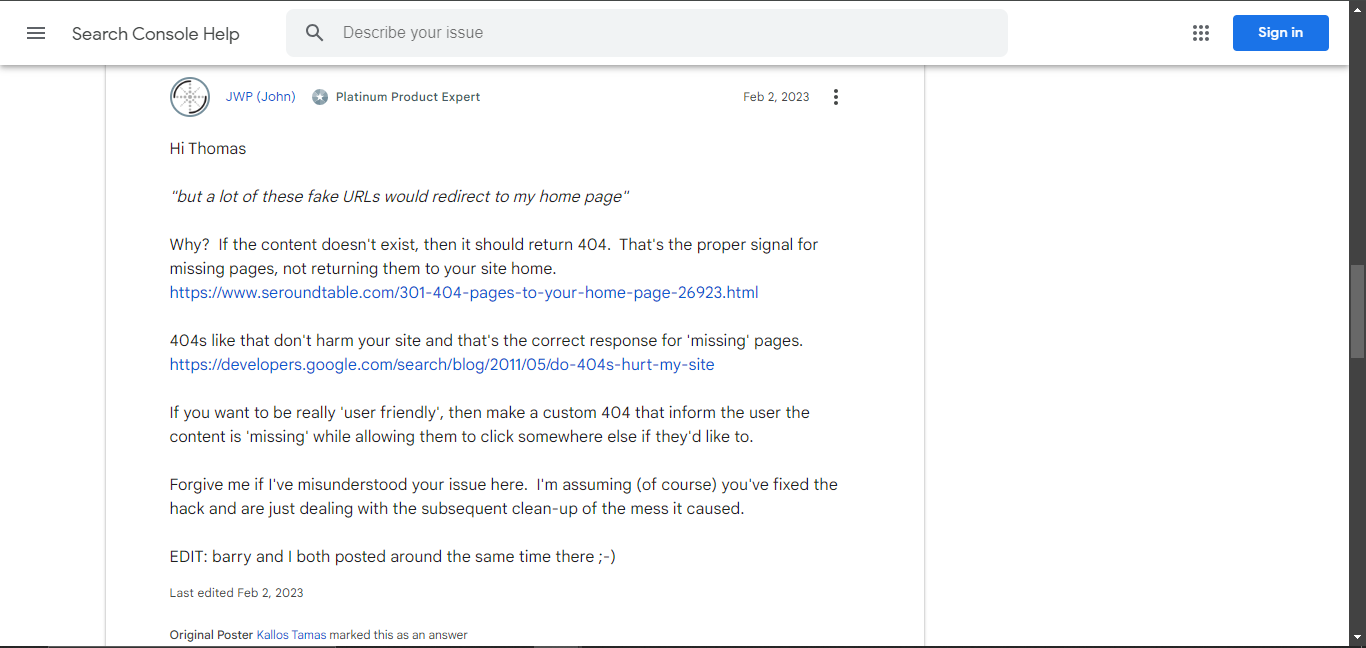
- If you’ve been redirecting non-existent pages to your homepage (a common mistake), stop this practice immediately. Instead, ensure that these pages return a proper 404 error code.
- You can create a custom 404 page that is user-friendly and offers links to other relevant content on your site. This helps users find what they’re looking for and improves their experience on your site.
3. Deindex Fake URLs
Use the “Remove URLs” tool in Google Search Console to request the removal of fake URLs from the index. This is a temporary solution, so you’ll also need to ensure that these URLs return a proper 404 status code to prevent them from being re-indexed. Update your sitemap and resubmit it to Google. This will help ensure that only legitimate URLs are indexed moving forward.
4. Monitor Your Site Regularly
Continue to monitor your site for fake 404 errors by regularly checking your GSC account, conducting site audits, and running security scans. This will help you catch any issues early and address them before they cause significant problems. Consider enabling email notifications in GSC so that you’re alerted as soon as new 404 errors are detected.
5. Implement Proper Security Measures
To prevent future hacks and the creation of fake URLs, implement strong security measures on your site. This includes using secure passwords, keeping your software up to date, and enabling two-factor authentication (2FA) where possible. Regularly back up your website so that you can quickly restore it in case of a security breach.
6. Check for Plugins or Theme Issues
Sometimes fake 404 errors can be caused by misconfigured plugins or themes. If you’re using an SEO plugin like Rank Math or Yoast, review your settings to ensure that redirects and indexing options are configured correctly. If you suspect that a plugin is causing the issue, try disabling it and see if the fake 404s persist. You may need to reach out to the plugin developer for support or switch to an alternative plugin.
Best Practices to Avoid Fake 404 Errors in the Future
Preventing fake 404 errors should be part of your ongoing website maintenance and SEO strategy. Here are some best practices to help you avoid these issues in the future:
- Regularly Audit Your Site: Conduct regular audits of your site to check for broken links, 404 errors, and suspicious URLs. This will help you catch any issues early and prevent them from becoming major problems.
- Secure Your Website: Implement strong security measures such as using secure passwords, keeping your software up to date, and enabling two-factor authentication. Regular security scans can also help detect any vulnerabilities before they’re exploited.
- Use Proper 404 Handling: Ensure that non-existent pages on your site return a proper 404 status code rather than redirecting users to your homepage or other pages. A custom 404 page can help improve user experience by offering helpful links and information.
- Keep Your Sitemap Updated: Make sure your sitemap is always up to date and accurately reflects the pages on your site. Submit your sitemap to Google Search Console regularly to ensure that only legitimate URLs are indexed.
- Monitor Your GSC Account: Regularly check your Google Search Console account for any new 404 errors or other issues. By staying on top of these issues, you can address them before they negatively impact your site’s SEO.
Case Study: Handling Fake 404 Errors
To put these strategies into context, let’s look at an example from a real-life scenario where a website owner faced an issue with fake 404 errors due to a security breach.
The Problem:
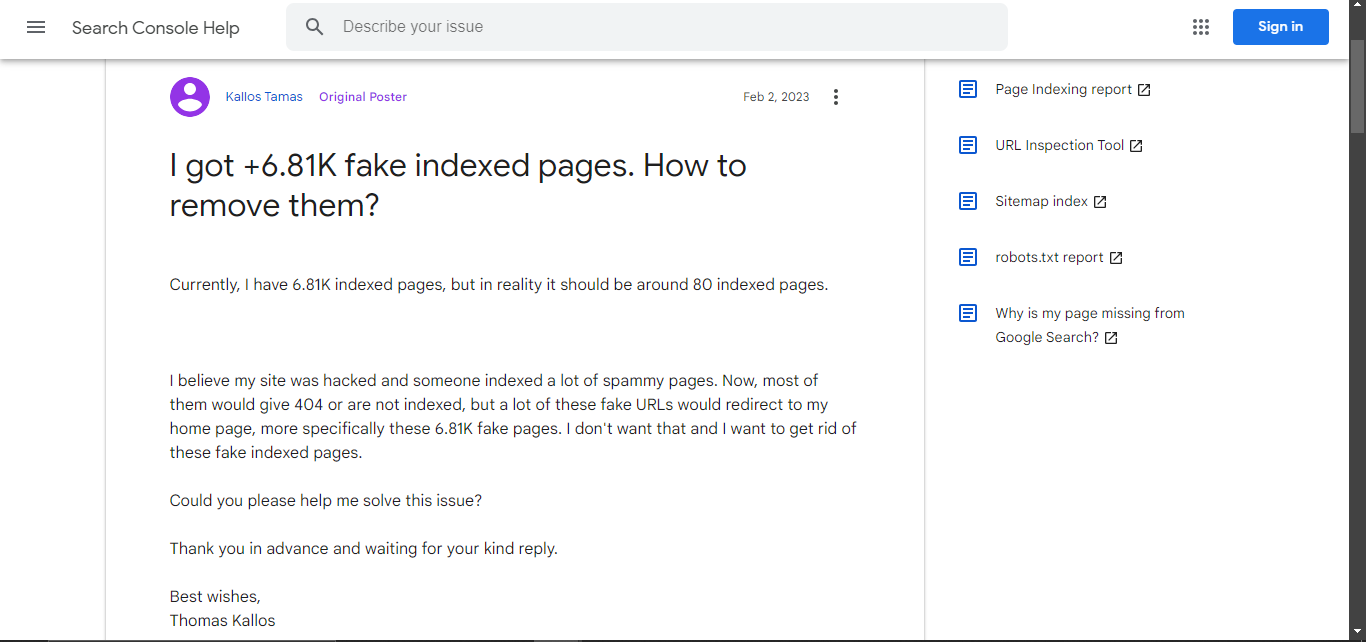
A website owner, Thomas, noticed that his Google Search Console was reporting over 6.81K indexed pages, even though his website only had around 80 legitimate pages. Most of these fake URLs were redirecting to his homepage, which was confusing for both users and search engines.
The Solution:
After realizing his website had been hacked, Thomas took several steps to resolve the issue:
- He removed the malicious code and cleaned up his site using security plugins.
- He disabled the redirects that were sending non-existent pages to his homepage and ensured that these URLs returned proper 404 error codes.
- He updated and resubmitted his sitemap to Google, requesting the removal of the fake URLs from the index.
- He continued to monitor his site and made sure that his security measures were up to date to prevent future attacks.
Conclusion
Fake 404 errors, malware URLs, and indexed 404 URLs can be incredibly damaging to your website’s SEO and user experience. Left unchecked, they can cause a significant drop in organic traffic, lower your search engine rankings, and even put your site at risk for further security breaches. By implementing the strategies outlined in this article, you’ll be better equipped to handle fake 404 errors and protect your website from the negative consequences they can bring. Keep your site secure, monitor for issues regularly, and always follow best practices to maintain a healthy and well-functioning online presence.


