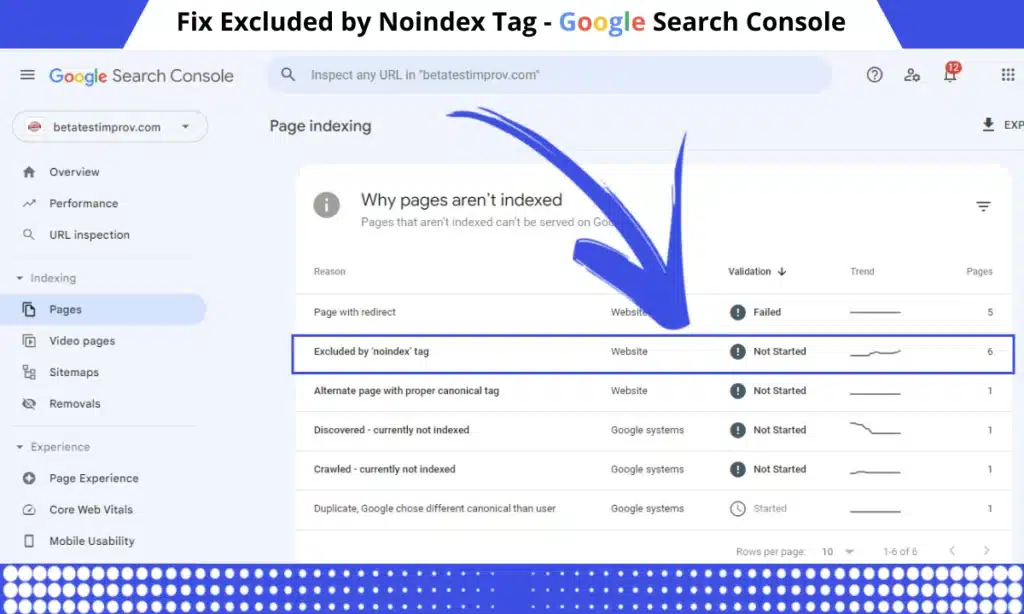
Dealing with the Excluded by ‘noindex’ tag issue in Google Search Console can be a bit tricky. Whether you’re an SEO expert or just managing your own website, understanding and resolving this issue is crucial to ensure your important pages get indexed by Google. In this article, we’ll explore what ‘noindex’ means, why it appears, and how to fix it step-by-step.
Use this tool to check if a webpage is marked as noindex through a meta tag or X-Robots-Tag header. Simply enter a URL and get real-time results on its indexability.
Checking...
Ways to Mark a Page as Noindex
By Noindex Meta Tag
A ‘noindex’ meta tag is an HTML tag you can add to your webpage’s source code to tell search engines not to index the page. It’s often used for pages that don’t need to appear in search results, like login pages, thank you pages, or certain admin pages.
<meta name="robots" content="noindex">
By HTTP Header
A noindex HTTP header works similarly but is added at the server level. It instructs search engines not to index the page, just like the meta tag, but it’s included in the HTTP response.
HTTP/1.1 200 OK
X-Robots-Tag: noindex
How Noindex Works: The Technical Side
Understanding how search engines process noindex directives helps you implement them correctly.
Noindex Discovery Process
Googlebot Requests Page → Your server responds with HTTP headers
Headers Checked First → X-Robots-Tag in HTTP response header
HTML Downloaded → If no X-Robots-Tag, check for meta robots tag
Decision Made → Page excluded from index (but links still followed unless nofollow specified)
Meta Robots vs. X-Robots-Tag: When to Use Each
Use Meta Robots Tag When: – You control the HTML/template layer – You want page-specific noindex directives – You’re using a CMS with SEO plugins
Use X-Robots-Tag When: – You need to noindex non-HTML files (PDFs, images, videos) – You want centralized control via .htaccess or server config – You’re blocking entire directories or file types
Example X-Robots-Tag for PDF Files:
# In .htaccess
<FilesMatch "\.pdf$">
Header set X-Robots-Tag "noindex, nofollow"
</FilesMatch>
Platform-Specific Noindex Implementation
WordPress: Adding and Removing Noindex
Method 1: Using Yoast SEO
Edit the page/post
Scroll to Yoast SEO meta box
Click the gear icon (Advanced)
Set Allow search engines to show this page in search results? to No
Update the page
Method 2: Using Rank Math
Edit the page
Find Rank Math meta box
Click Advanced tab
Toggle Robots Meta to No Index
Save changes
Method 3: Programmatically (functions.php)
// Add noindex to specific page types
function custom_noindex_pages() {
    // Noindex all author archives (single author blog)
    if (is_author()) {
        echo '<meta name="robots" content="noindex, follow" />';
    }
    // Noindex all tag pages with < 3 posts
    if (is_tag()) {
        $tag = get_queried_object();
        if ($tag->count < 3) {
            echo '<meta name="robots" content="noindex, follow" />';
        }
    }
    // Noindex attachment pages
    if (is_attachment()) {
        echo '<meta name="robots" content="noindex, follow" />';
    }
}
add_action('wp_head', 'custom_noindex_pages', 1);
Removing Noindex from WordPress:
Check these locations:
Settings → Reading → Ensure Discourage search engines from indexing this site is UNCHECKED
Page/Post Level → Remove noindex from individual pages via SEO plugin
Theme Functions → Check for custom noindex code in functions.php
Coming Soon Plugins → Deactivate SeedProd, WP Maintenance Mode, etc.
Check SEO Apps: – Review settings in Plug in SEO, SEO Manager, etc. – Disable global noindex settings
WooCommerce: Product & Category Noindex
Noindex Product Variations:
// In functions.php or custom plugin
add_action('wp_head', 'noindex_product_variations');
function noindex_product_variations() {
    if (is_product()) {
        global $product;
        if ($product && $product->is_type('variation')) {
            echo '<meta name="robots" content="noindex, follow" />';
        }
    }
}
Noindex Out of Stock Products:
add_action('wp_head', 'noindex_out_of_stock');
function noindex_out_of_stock() {
    if (is_product()) {
        global $product;
        if ($product && !$product->is_in_stock()) {
            echo '<meta name="robots" content="noindex, follow" />';
        }
    }
}
Noindex Empty Categories:
add_action('wp_head', 'noindex_empty_categories');
function noindex_empty_categories() {
    if (is_product_category()) {
        $term = get_queried_object();
        if ($term && $term->count === 0) {
            echo '<meta name="robots" content="noindex, follow" />';
        }
    }
}
Troubleshooting Noindex Issues
Issue 1: Noindex Not Being Respected
Symptom: Page still appears in Google despite noindex tag
Possible Causes:
Blocked by robots.txt: If robots.txt blocks the page, Google can’t see the noindex tag
Cached Version: Google may show cached version for a while
Conflicting Directives: Both noindex and index tags present
# Look for rules like:
Header set X-Robots-Tag "noindex, nofollow"
Quick Fix:
// WordPress: Force remove noindex from specific page
add_filter('wp_robots', 'force_index_specific_page', 99);
function force_index_specific_page($robots) {
    if (is_page(123)) { // Replace 123 with your page ID
        unset($robots['noindex']);
        $robots['index'] = true;
    }
    return $robots;
}
Issue 3: Noindex Not Removing Pages from Index
Symptom: Added noindex but pages still in Google after weeks
Why This Happens:
– Google needs to recrawl to see the noindex tag
– If robots.txt blocks the URL, Google can’t see noindex directive
– Low crawl priority delays discovery
Solution:
Ensure Page is Crawlable:
# robots.txt - ALLOW the page first
User-agent: *
Allow: /page-to-deindex/
# Then add noindex tag to the page itself
Request Removal (Temporary):
– GSC → Removals → New Request
– Enter URL
– Temporary removal for 6 months while noindex processes
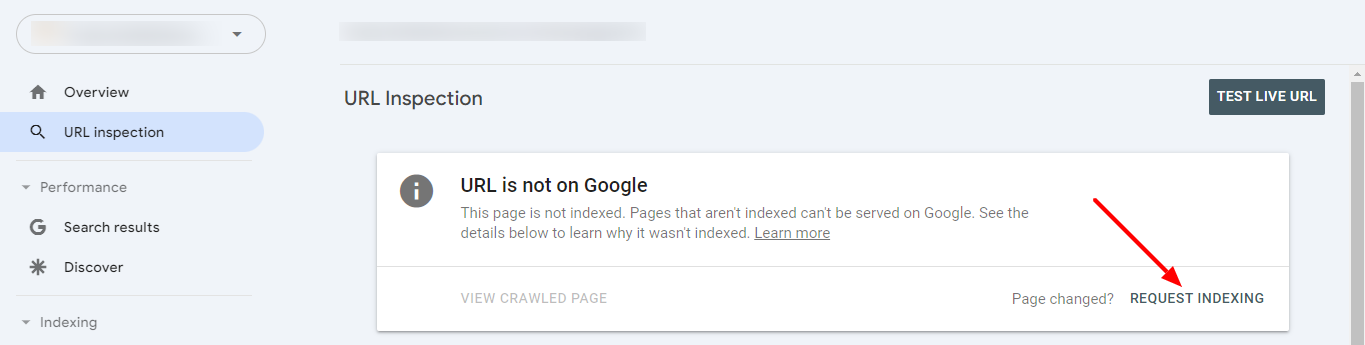
Force Recrawl:
– GSC → URL Inspection
– Enter URL
– Click Request Indexing
✅ Pages That SHOULD Be Noindexed
✅ Always Noindex:
– Login/register pages
– Shopping cart & checkout pages
– Customer account dashboards
– Search result pages
– Admin panels
– Password reset pages
– Email preference pages
– Private/draft content
✅ Usually Noindex:
– Filtered category pages (?color=red&size=large)
– Pagination beyond page 1 (debatable)
– Tag archives with < 3 posts
– Author archives on single-author blogs
– Attachment/media pages
– Print-friendly versions
– Date-based archives
⚠️ Conditional Noindex:
– Out of stock products (if permanently out)
– Seasonal/temporary content (after season ends)
– Duplicate content in multiple languages (use hreflang instead)
– Content under 200 words (improve it first)
❌ Pages You Should NEVER Noindex
– Homepage
– Primary product/service pages
– Main category pages
– Blog posts
– Landing pages with unique content
– About/contact pages
– Content you want to rank
Common Noindex Mistakes
Mistake #1: Noindexing Mobile Version
Wrong:
<!-- On mobile subdomain m.example.com -->
<meta name="robots" content="noindex, follow">
Right: Use responsive design or dynamic serving, never noindex mobile versions.
Mistake #2: Noindex + Blocked by Robots.txt
Wrong:
# robots.txt
Disallow: /private/
# AND noindex tag on /private/ pages
Why It’s Wrong: Google can’t crawl to see noindex tag
Right:
# robots.txt - Allow crawling
Allow: /private/
# BUT add noindex meta tag to pages
<meta name="robots" content="noindex, follow">
Mistake #3: Using Noindex Instead of Canonical
Wrong:
<!-- Noindexing product color variations -->
<!-- On /shirt-red -->
<meta name="robots" content="noindex, follow">
Right:
<!-- Use canonical instead -->
<link rel="canonical" href="https://example.com/shirt">
Mistake #4: Noindexing Development Site, Forgetting to Remove on Live
Prevention Checklist:
// WordPress: Conditional noindex based on environment
if (defined('WP_ENV') && WP_ENV === 'development') {
    add_action('wp_head', function() {
        echo '<meta name="robots" content="noindex, nofollow" />';
    }, 1);
}
Conclusion
Fixing the URL marked ‘noindex’ issue in Google Search Console involves understanding what ‘noindex’ directives are, why they’re used, and how to address them. By following the steps outlined above, you can ensure your important pages are indexed and improve your site’s visibility in search results.