
If you manage a large website or an enterprise-level platform, you already know how fast duplicate content problems multiply. A single product available in three colors, sortable by price and rating, accessible via both HTTP and HTTPS, and reachable through both www and non-www URLs — that is potentially dozens of duplicate pages created from a single product. Canonical tags are your most powerful tool to solve this problem at scale, and this guide will show you exactly how to use them like an expert.
What Are Canonical Tags and Why Do They Matter?
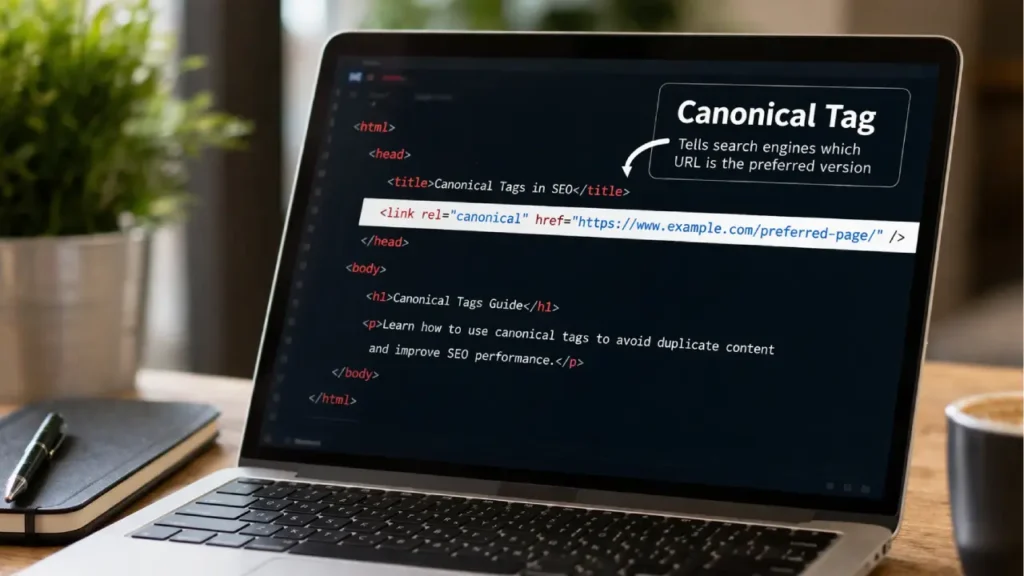
Canonical tags (officially the rel="canonical" link element) are HTML signals you place in the <head> of a webpage to tell search engines which version of a URL you consider the “master” or preferred version. When Google encounters multiple URLs with identical or near-identical content, it uses canonical tags to consolidate ranking signals onto one page instead of splitting them across many.
Here is what a canonical tag looks like in practice:
<link rel="canonical" href="https://www.example.com/blue-running-shoes/" />This single line of code tells Googlebot: “No matter how you arrived at this page, the real page I want indexed is this URL.”
Without properly implemented canonical tags, your site risks keyword cannibalization, diluted PageRank, wasted crawl budget, and ranking instability — all of which become exponentially worse as your site grows to thousands or millions of pages.
The Core Duplicate Content Problems on Large Sites
Before diving into advanced canonical tags strategies, you need to understand where duplicate content originates on enterprise sites. The sources are more varied than most SEO professionals realize.
1. URL Parameters
E-commerce and large content platforms generate parameter-based URLs for sorting, filtering, session tracking, and pagination. A single product page can appear as:
/shoes/?color=blue/shoes/?sort=price-asc/shoes/?ref=homepage/shoes/?session_id=abc123
Each of these is technically a unique URL, but all may render nearly identical content. Canonical tags pointing each variant back to /shoes/ consolidates all their signals.
2. Faceted Navigation
Category pages with filtering systems (size, color, brand, price range) are a leading cause of duplicate content on retail and directory sites. Our guide on SEO for Faceted Navigation covers this in depth, and canonical tags are the recommended first line of defense before you consider noindexing filter pages.
3. WWW vs. Non-WWW and HTTP vs. HTTPS
Enterprise sites migrated from HTTP to HTTPS often leave orphaned HTTP versions accessible. Similarly, www and non-www versions can both be reachable. Canonical tags combined with 301 redirects are essential in these scenarios.
4. Pagination
Large blogs, product catalogs, and news archives create paginated series. Without proper canonical tags or pagination signals, Google may treat /category/page/2/ as a separate content entity competing with page 1.
5. Print-Friendly and Mobile-Specific URLs
Some older enterprise CMS systems generate /page/?print=1 or m.domain.com/page/ versions. These duplicates fly under the radar unless audited specifically. Our article on mobile crawl issues and SEO explains how to audit and fix these.
Self-Referential Canonical Tags: The Foundation You Cannot Skip
Every page on your site — even the “original” version — should include a canonical tag pointing to itself. This is called a self-referential canonical and it is non-negotiable on enterprise sites.
Why? Because search engines may still discover your preferred URL through unusual paths — CDN subdomains, AMP versions, or syndicated content. A self-referential canonical tag ensures your signal is unambiguous regardless of how the page is accessed.
<!-- On your main product page -->
<link rel="canonical" href="https://www.example.com/product/wireless-headphones/" />
This is best implemented at the CMS or template level so every page automatically includes the correct canonical tag without manual intervention.
Dynamic Canonical Tags at Scale: Template-Level Implementation
On a site with 50,000 pages, you cannot manually set canonical tags for each URL. The solution is dynamic generation at the template level, where your CMS or application logic automatically outputs the correct canonical URL based on rules you define.
For WordPress sites, popular SEO plugins like Rank Math and AIOSEO can generate canonical tags automatically. However, on enterprise WordPress installs, plugin-generated canonicals often need custom filtering to handle edge cases. You can use the get_canonical_url filter in WordPress to override defaults programmatically.
For custom CMS or headless architectures, your canonical logic needs to strip tracking parameters, enforce HTTPS, standardize trailing slashes, and always use the www or non-www version consistently. If you are running JavaScript frameworks, read our guide on technical SEO for modern JavaScript frameworks — canonical tags in client-side rendered environments have specific implementation requirements.
For e-commerce platforms, product variants (size S, M, L) are one of the most common sources of duplicate pages. The recommended approach is to set canonical tags on all variant pages pointing to the main product page, unless each variant has genuinely distinct content and commercial intent.
Canonical Tags vs. Noindex: Choosing the Right Signal
One of the most common mistakes on enterprise sites is using noindex when canonical tags are the better choice, and vice versa. Here is how to think about this:
Use Canonical Tags When:
- The page has value and you want its link equity to flow to the preferred URL
- You want the preferred version to appear in search results
- The duplicate is caused by parameters, sorting, or filtering
Use Noindex When:
- The page should never appear in search results under any circumstances
- The page exists for internal use (internal search results, admin pages)
- The content genuinely adds no SEO value and you do not want it crawled
Our detailed breakdown of noindex vs. nofollow explains these distinctions with practical examples. Importantly, canonical tags pass PageRank signals while noindex does not — this alone makes canonicalization preferable in most duplicate content scenarios.
Cross-Domain Canonical Tags: An Advanced Enterprise Strategy
Canonical tags are not limited to within your own domain. Cross-domain canonical tags allow you to tell Google that content published on a partner site, syndication network, or subdomain has its canonical version on your main domain.
This is particularly useful for:
- News publishers whose articles get syndicated to aggregators
- Enterprise brands with content published across multiple regional domains
- Companies that republish blog content across multiple owned properties
<!-- On the syndicated version at partner-site.com -->
<link rel="canonical" href="https://www.yourdomain.com/original-article/" />
However, cross-domain canonical tags carry risk. If implemented incorrectly — for example, pointing to a page that 404s or that itself has a different canonical — Google will ignore the signal. Always validate the target URL before implementing cross-domain canonical tags.
For international sites using hreflang alongside canonical tags, the interaction between these two signals is complex. Our complete hreflang implementation guide explains the correct order of operations.
Canonical Tags and URL Parameters: A Systematic Approach
URL parameters are the largest source of canonical confusion on enterprise sites. Here is a systematic framework for handling them:
Step 1: Audit All Parameter Types
Use Google Search Console’s URL inspection tool and your server log files to identify every parameter pattern being crawled. Our guide on log file analysis for SEO covers how to extract and categorize this data.
Step 2: Classify Each Parameter
- Content-changing parameters (e.g., language, location, product ID): These may warrant unique indexed pages with individual canonical tags
- Display-changing parameters (e.g., sort order, pagination offset): Point these back to the clean base URL with canonical tags
- Tracking parameters (e.g., utm_source, ref, affiliate ID): Always strip these in canonical tags — they should never appear in your canonical URL
Step 3: Implement Canonical Tags Consistently
Ensure every parameterized URL renders a canonical tag pointing to the clean version. Test with Google’s URL Inspection tool to confirm Google is reading the intended canonical.
Step 4: Supplement with robots.txt for Extreme Cases
In cases where crawl budget waste is severe, use robots.txt to block crawling of high-volume parameter combinations — but only after canonical tags are correctly in place. Never rely on robots.txt alone to solve duplicate content; canonical tags are the signal that actually consolidates ranking signals. For more on crawl management, see our guide on crawl budget optimization for enterprise websites.
Diagnosing Canonical Tag Errors with Google Search Console
Google Search Console’s Coverage report surfaces one of the most important — and most misunderstood — canonical issues: “Duplicate, Google chose different canonical than user.”
This status means you specified a canonical in your HTML, but Google decided a different URL was actually the better canonical. This is Google overriding your signal, which happens when:
- Your specified canonical URL has less authority than an alternative version
- There are conflicting signals (e.g., your canonical points to URL A but your sitemap lists URL B)
- Internal links predominantly point to a different version than your canonical
- Your specified canonical URL redirects, has a noindex tag, or returns a non-200 status
Our full guide on how to fix “Duplicate, Google chose different canonical than user” walks through each scenario with solutions. Additionally, the Coverage Errors guide for Google Search Console explains how to interpret and prioritize all indexing issues in bulk.
Canonical Tags in XML Sitemaps: Aligning Your Signals
Your XML sitemap and your canonical tags must tell the same story. Including a URL in your sitemap is a strong signal to Google that you consider it an important, canonical page. If your sitemap includes URLs that have canonical tags pointing elsewhere, you are sending contradictory signals.
Best Practices for Sitemap-Canonical Alignment:
- Only include canonical URLs in your sitemap — never include parameter URLs or variant pages
- Periodically audit your sitemap against your canonical declarations
- For large sites with 50,000+ URLs, use indexed sitemaps with clear segmentation
Read our guide on XML sitemap best practices for large sites for a complete framework. Also, learn how to export sitemap URLs to CSV for SEO audits — this is invaluable when cross-referencing canonicals at scale.
Canonical Tags for AMP Pages
If your enterprise site uses Accelerated Mobile Pages (AMP), canonical tags serve a dual function. The AMP version of a page must include a canonical tag pointing to the regular HTML version, and the regular HTML version should include a link pointing back to the AMP version.
<!-- On the AMP page -->
<link rel="canonical" href="https://www.example.com/article/" />

<!-- On the regular HTML page -->
<link rel="amphtml" href="https://www.example.com/amp/article/" />
Failure to implement this correctly results in both versions competing for indexation rather than working together. Our guide on AMP and non-AMP pages covers this in full.
Automating Canonical Tag Audits at Enterprise Scale
Manual canonical audits are impossible beyond a few thousand pages. Enterprise SEO requires automation at every level.
Tools and Approaches for Automated Canonical Auditing:
- Screaming Frog SEO Spider: Can crawl your entire site, extract canonical declarations, and flag mismatches between specified and resolved canonicals
- Sitebulb: Provides visual canonical chain analysis and identifies pages where canonicals are being overridden
- Custom Python scripts: Using libraries like
requestsandBeautifulSoupto compare canonical declarations across large URL sets programmatically - Google Search Console API: Pull coverage data programmatically to monitor canonical overrides at scale
For teams managing enterprise SEO, our guide on automating technical SEO audits for enterprise sites provides a complete automation framework. Pair this with SEO monitoring for large websites to set up alerts when canonical configurations change unexpectedly.
Common Canonical Tag Mistakes That Hurt Rankings
Even experienced SEO teams make canonical mistakes. Here are the most damaging ones to avoid:
1. Chained Canonicals
Page A canonicals to Page B, which canonicals to Page C. Google only follows one hop. Always point directly to the final preferred URL.
2. Canonicalizing to a Redirected URL
Your canonical must point to a 200-status page, not a URL that redirects. Check all canonical targets regularly. Our guide on redirect chains and loops explains how to detect and fix these.
3. Canonicalizing to a Noindexed Page
This sends completely contradictory signals — “this is the preferred version, but don’t index it.” Google will ignore both signals.
4. Using Canonical Tags Inconsistently Across Paginated Series
Some sites canonical all paginated pages back to page 1. This is often wrong for large content archives where page 2 and beyond have unique content value.
5. Forgetting About Duplicate Content from WordPress Tag and Category Archives
WordPress generates multiple archive URLs that often duplicate content. Using canonical tags or noindex on category and tag pages is essential. See our guide on noindexing categories and tags in WordPress.
Canonical Tags and Internal Linking: The Hidden Connection
One aspect of canonical tags that many practitioners overlook is the relationship between canonicalization and internal linking. When your internal links consistently point to a non-canonical URL, you are undermining your own canonical signal. Google uses internal link patterns as one of the factors when determining which URL to treat as canonical — and if your navigation, breadcrumbs, and content links all point to /product/?color=blue rather than /product/, that vote counts.
This is why a clean internal linking strategy is not just a UX concern — it directly reinforces your canonical tags and ensures Google’s understanding of your site structure matches your intent.
Canonical Issues Specific to WordPress
WordPress is the CMS of choice for millions of sites, including many enterprise deployments, but it generates several canonical-specific challenges:
- Tag and category archive pages often duplicate post content
- Author archive pages can create thin or duplicate content
- Date-based archives add hundreds of low-value duplicate pages
- Search result pages (
?s=query) are often crawlable and duplicative - The
?p=123permalink format creates parallel URLs to slug-based URLs
The good news is that most of these are solvable at the template level with the right configuration. Our guide on fixing duplicate content issues in WordPress and the companion guide on canonical issues explained provide step-by-step solutions for each scenario.
A Canonical Tag Implementation Checklist for Enterprise Sites
Use this checklist when auditing or implementing canonical tags across a large site:
- Every page has a self-referential canonical tag
- All parameter variants point canonically to the clean base URL
- WWW and non-WWW versions are unified (canonical + 301 redirect)
- HTTP URLs canonical to HTTPS equivalents (canonical + 301 redirect)
- Sitemap only includes canonical URLs
- Internal links consistently use canonical URL formats
- No canonical chains — all canonicals point directly to final URLs
- No canonicals pointing to redirected or noindexed URLs
- AMP pages correctly cross-reference HTML versions
- Cross-domain canonicals validated and target URLs confirmed live
- Google Search Console monitored for “Google chose different canonical” warnings
- Automated audits scheduled quarterly (or on every major deployment)
Need Help Implementing Canonical Tags on Your Site?
Canonical tag strategy at enterprise scale requires deep technical knowledge, careful auditing, and ongoing monitoring. If you would like expert help diagnosing and fixing canonical issues — or if you want a full technical SEO audit of your site — visit our Services page to see how we work with large and enterprise sites.
You can also reach out directly through our Contact page — we would be glad to help you eliminate duplicate content and strengthen your site’s indexation health.
Final Thoughts
Canonical tags are not a set-it-and-forget-it tool. On enterprise sites, they require systematic implementation, cross-team coordination (SEO, development, content), and regular auditing as the site evolves. The cost of getting them wrong is real — diluted rankings, wasted crawl budget, and content that never reaches its organic potential.
Master canonical tags by treating them as a core part of your technical infrastructure rather than an SEO afterthought, and you will see measurable improvements in indexation quality, ranking consolidation, and overall organic performance.
Frequently Asked Questions
A canonical tag is an HTML element that tells search engines which version of a URL is the preferred one when multiple duplicate or similar pages exist. It helps consolidate ranking signals and avoid duplicate content issues.
Canonical tags are important for large websites because they prevent duplicate content caused by filters, parameters, and faceted navigation. They help consolidate SEO signals and improve indexation efficiency.
A self-referential canonical tag is when a page points to itself as the canonical URL. It helps confirm the correct version of the page and reduces confusion for search engines.
No, canonical tags cannot replace 301 redirects. Canonical tags are a hint for search engines, while 301 redirects permanently send users and bots to a new URL.
Google uses canonical tags as a hint but may choose a different URL if it finds stronger signals such as internal links, sitemap data, or page authority differences.
This means Google ignored your specified canonical and selected another URL as the preferred version due to stronger ranking or structural signals.
Not always. For large sites, paginated pages may contain unique content and should not always be canonicalized to page 1, as this can reduce visibility in search results.
In WordPress, canonical tags are usually generated automatically by SEO plugins, but custom setups may require manual adjustments to ensure correct URL targeting.
You can use SEO tools like crawling software to detect missing, conflicting, or incorrect canonical tags and ensure consistency across your entire website.
Yes, canonical tags help consolidate ranking signals like link equity toward the preferred URL, although they are not as strong as 301 redirects.


